Paper: BigTable
BigTable/Wide Column Storage System
Goal
Design a distributed and scalable system that can store a huge amount of semi-structured data. The data will be indexed by a row key where each row can have an unbounded number of columns.
What is BigTable
- BigTable is a distributed and massively scalable wide-column store.
- Designed to store huge sets of structured data.
- Provides storage for very big tables (often in the terabyte range)
- BigTable is a CP system, i.e., it has strongly consistent reads and writes.
- BigTable can be used as an input source or output destination for MapReduce.
Background
- Developed at Google in 2005 and used in dozens of Google services.
- Google couldn’t use external commercial databases because of its large scale services, and costs would have been too high. So they built an in-house solution, custom built for their use case and traffic patterns.
- BigTable is highly available(?? With consistency??) and high-performing database that powers multiple applications across Google — where each application has different needs in terms of the size of data to be stored and latency with which results are expected.
- BigTable inspired various open source databases like Cassandra(borrow BigTable’s DataModel), HBase(Distributed Non-Relational Database) and HyperTable.
BigTable UseCases
- Google built BigTable to store large amounts of data and perform thousands of queries per second on that data.
- Examples of BigTable data are billions of URLs with many versions per page, petabytes of Google Earth data, and billions of users’ search data.
- BigTable is suitable to store large datasets that are greater than one TB where each row is less than 10MB.
- Since BigTable does not provide ACID properties or transaction support(Across Rows or Tables), OLTP applications should not use BigTable.
- Data should be structured in the form of key-value pairs or rows-columns.
- Non-structured data like images or movies should not be stored in BigTable.
- Google examples:
- BigTable can be used to store the following types of data:
Big Table Data Model
Agenda
- Rows
- Column families
- Columns
- Timestamps
Details
BigTable can be characterized as a sparse, distributed, persistent, multidimensional, sorted map.
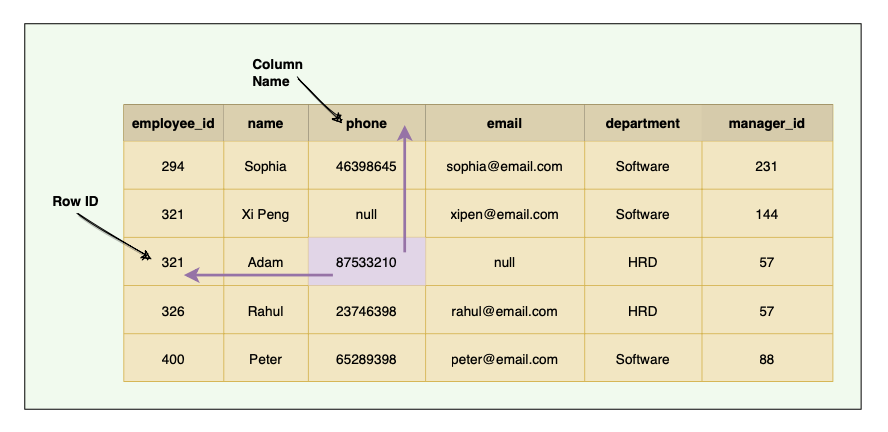
Traditional DBs have a two-dimensional layout of the data, where each cell value is identified by the ‘Row ID’ and ‘Column Name’.
BigTable has a four-dimensional data model. The four dimensions are:
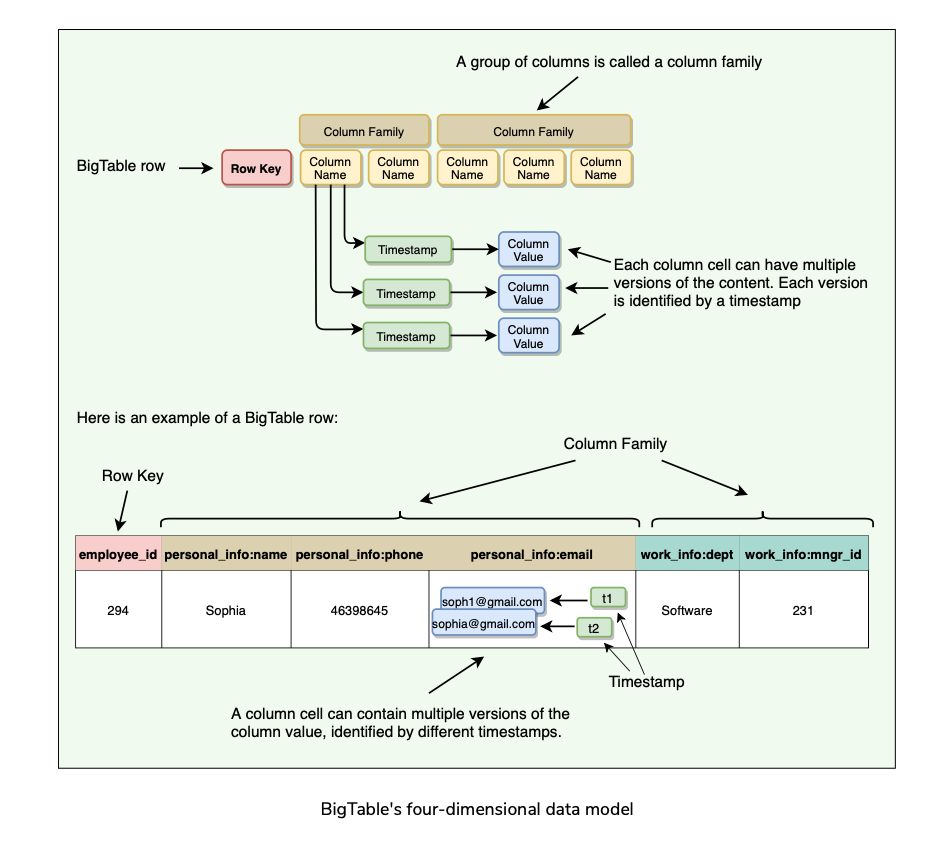
The data is indexed (or sorted) by row key, column key, and a timestamp. Therefore, to access a cell’s contents, we need values for all of them.
If no timestamp is specified, BigTable retrieves the most recent version.

Rows
- Each row in the table is uniquely identified by an associated row key(internally represented as String) that is an arbitrary string of up to 64 kilobytes in size (although most keys are significantly smaller).
- Every read or write of data under a single row is atomic.
- Atomicity across rows is not guaranteed, e.g., when updating two rows, one might succeed, and the other might fail.
- Each table’s data is only indexed by row key, column key, and timestamp. There are no secondary indices.
- A column is a key-value pair where the key is represented as ‘column key’ and the value as ‘column value.’
Column families
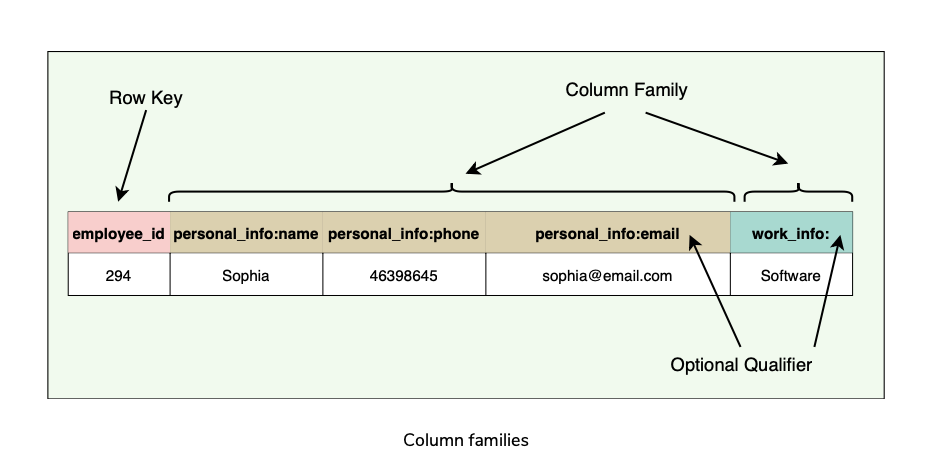
- Column keys are grouped into sets called column families. All data stored in a column family is usually of the same type. This is for compression purposes.
- The number of distinct column families in a table should be small (in the hundreds at maximum), and families should rarely change during operation.
- Access control as well as both disk and memory accounting are performed at the column-family level.
- All rows have the same set of column families.
- BigTable can retrieve data from the same column family efficiently.
- Short Column family names are better as names are included in the data transfer.
Columns
- Columns are units within a column family.
- A BigTable may have an unbounded number of columns.
- New columns can be added on the fly.
- Short column names are better as names are passed in each data transfer, e.g., ColumnFamily:ColumnName => Work:Dept
- BigTable is quite suitable for sparse data(Empty columns are not stored).
Timestamps
- Each column cell can contain multiple versions of the content.
- A 64-bit timestamp identifies each version that either represents real time or a custom value assigned by the client.
- While reading, if no timestamp is specified, BigTable returns the most recent version.
- If the client specifies a timestamp, the latest version that is earlier than the specified timestamp is returned.
- BigTable supports two per-column-family settings to garbage-collect cell versions automatically
System APIs
BigTable provides APIs for two types of operations:
- Metadata operations
- Data operations
Metadata operations
- APIs for creating and deleting tables and column families.
- Functions for changing cluster, table, and column family metadata, such as access control rights.
Data operations
- Clients can insert, modify, or delete values in BigTable.
- Clients can also lookup values from individual rows or iterate over a subset of the data in a table.
- BigTable supports single-row transactions(Single row atomic read/writes), which can be used to perform atomic read-modify-write sequences on data stored under a single row key.
- Bigtable does not support transactions across row keys, but provides a client interface for batch writing across row keys.
- BigTable allows cells to be used as integer counters.
- A set of wrappers allow a BigTable to be used both as an input source and as an output target for MapReduce jobs.
- Clients can also write scripts in Sawzall(a language developed at Google) to instruct server-side data processing (transform, filter, aggregate) prior to the network fetch.
- APIs for write operations:
- A read or scan operation can read arbitrary cells in a BigTable:
Partitioning and High Level Architecture
Table Partitioning
- A single instance of a BigTable implementation is known as a cluster.
- Each cluster can store a number of tables where each table is split into multiple Tablets, each around 100–200 MB in size.
- Tables broken into Tablets(row boundary) which hold a contiguous range of rows.
- Initially, each table consists of only one Tablet. As the table grows, multiple Tablets are created. By default, a table is split at around 100 to 200 MB.
- Tablets are the unit of distribution and load balancing.
- Since the table is sorted by row, reads of short ranges of rows(within a small number of Tablets) are always efficient. This means selecting a row key with a high degree of locality is very important.
- Each Tablet is assigned to a Tablet server, which manages all read/write requests of that Tablet.
High Level Architecture
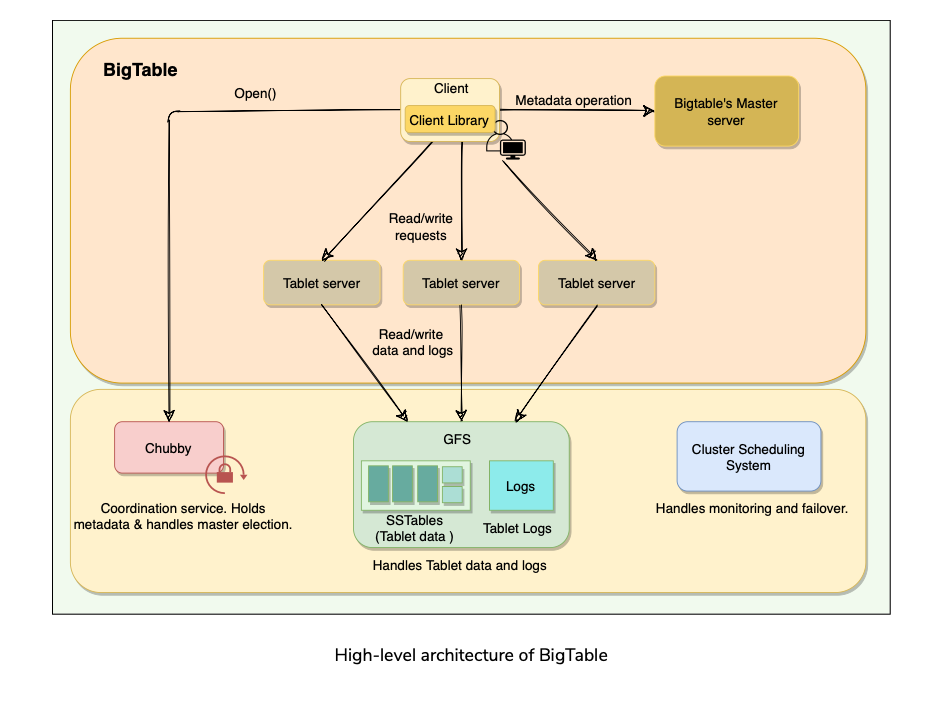
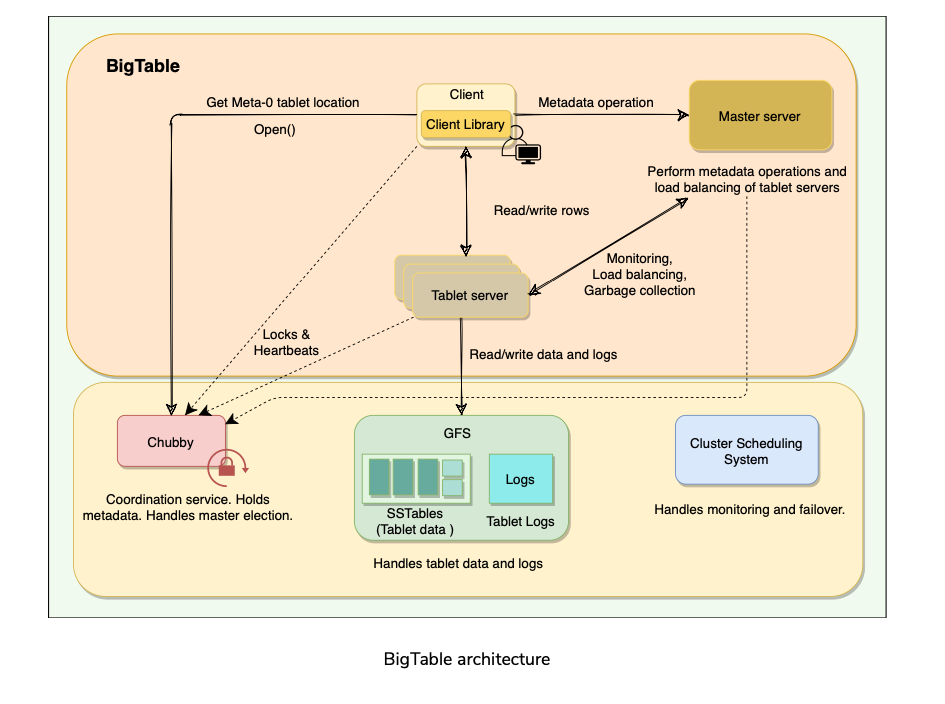
Big Table cluster consists of 3 major components:
Client Library: Application talks to BigTable using client library.
One master server: For doing metadata operations, managing Tablets and assigning Tablets to Tablet servers.
Many Tablet servers: Each Tablet server serves read and write of the data to the Tablets it is assigned. BigTable is built on top of several other pieces from Google infrastructure:
GFS: BigTable uses the Google File System to store its data and log files.
SSTable: Google’s Sorted String Table file format is used to store BigTable data.
Chubby: BigTable uses a highly available and persistent distributed lock service called Chubby to handle synchronization issues and store configuration information.
Cluster Scheduling System: Google has a cluster management system that schedules, monitors, and manages the Bigtable’s cluster.
SSTables
How are Tablets stored in GFS?
BigTable uses Google File System (GFS), a persistent distributed file storage system to store data as files.
The file format used by BigTable to store its files is called SSTable.
SSTables are persisted, ordered maps of keys to values, where both keys and values are arbitrary byte strings.
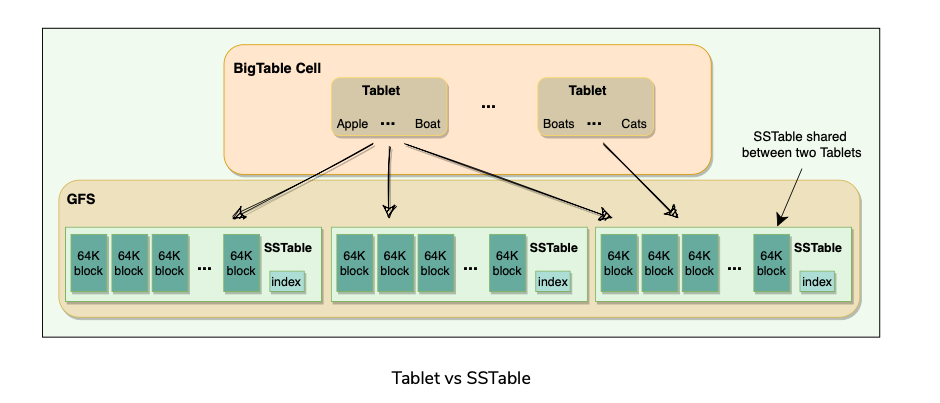
Each Tablet is stored in GFS as a sequence of files called SSTables.
An SSTable consists of a sequence of data blocks (typically 64KB in size).
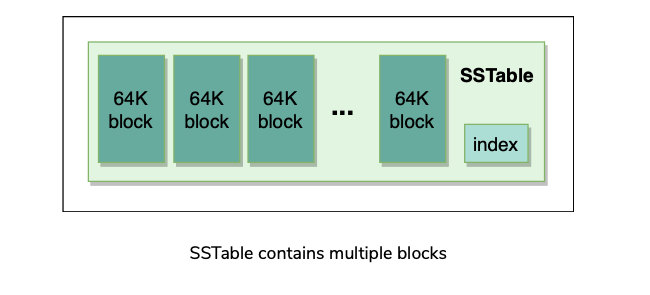
A block index is used to locate blocks; the index is loaded into memory when the SSTable is opened.
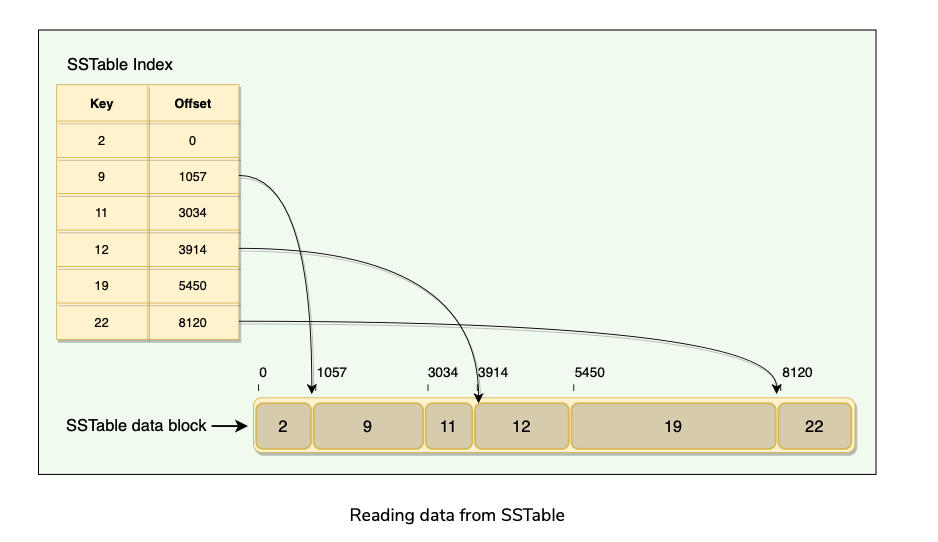
An SSTable lookup can be performed with a single disk seek. We first find the appropriate block by performing a binary search in the in-memory index, and then reading the appropriate block from the disk.
To read data from an SSTable, it can either be copied from disk to memory as a whole or can be done via just the index. The former approach avoids subsequent disk seeks for lookups, while the latter requires a single disk seek for each lookup.
SSTables provide two operations:
SSTable is immutable once written to GFS. If new data is added, a new SSTable is created. Once an old SSTable is no longer needed, it is set out for garbage collection.
SSTable immutability is at the core of BigTable’s data checkpointing and recovery routines.
Advantages of SSTable’s immutability:
Table vs Tablet vs SSTable
Multiple Tablets make up a table.
SSTables can be shared by multiple Tablets. [Why?]
Tablets do not overlap, SSTables can overlap.
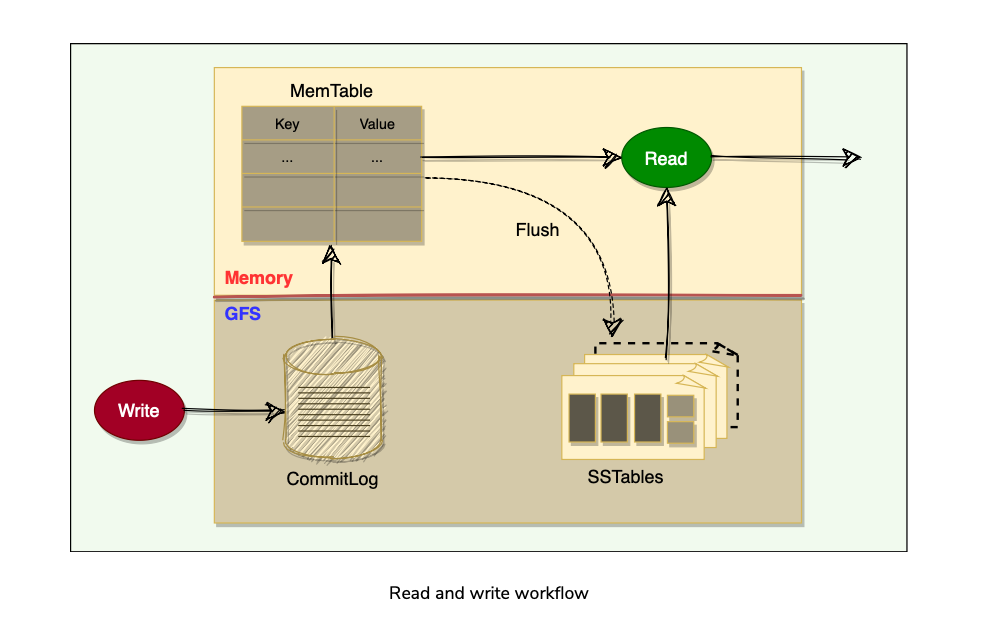
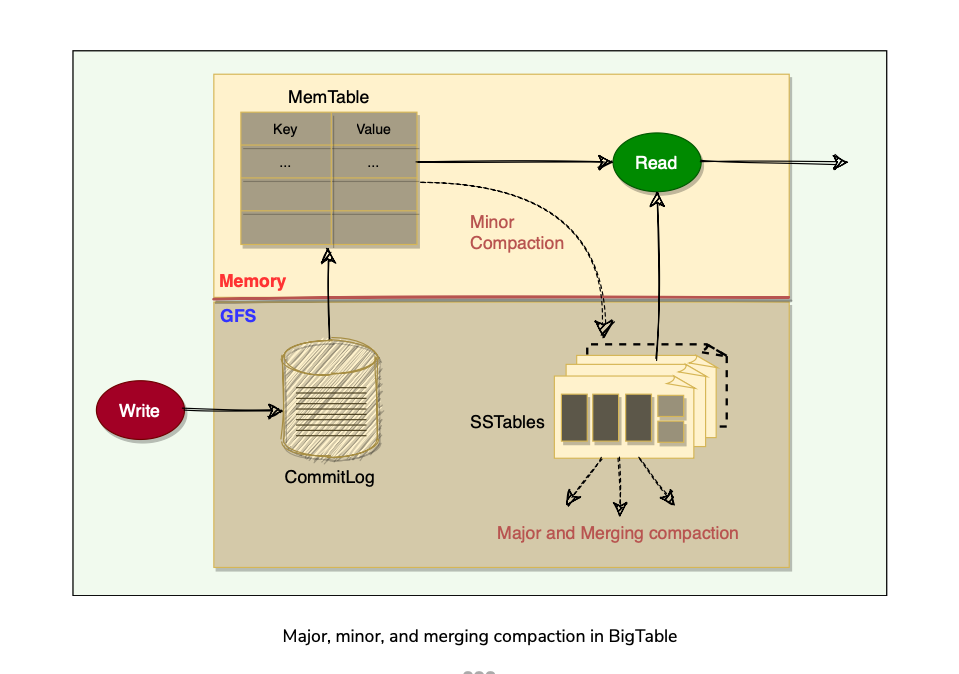
To improve performance, BigTable uses an in-memory, mutable sorted buffer called MemTable to store recent updates.
As more writes are performed, MemTable size increases, and when it reaches a threshold, the MemTable is frozen, a new MemTable is created, and the frozen MemTable is converted to an SSTable and written to GFS.
Each data update is also written to a commit-log(Write Ahead Log WAL) which is also stored in GFS. This log contains redo records used for recovery if a Tablet server fails before committing a MemTable to SSTable.
While reading, the data can be in MemTables or SSTables. Since both these tables are sorted, it is easy to find the most recent data.
GFS and Chubby
GFS
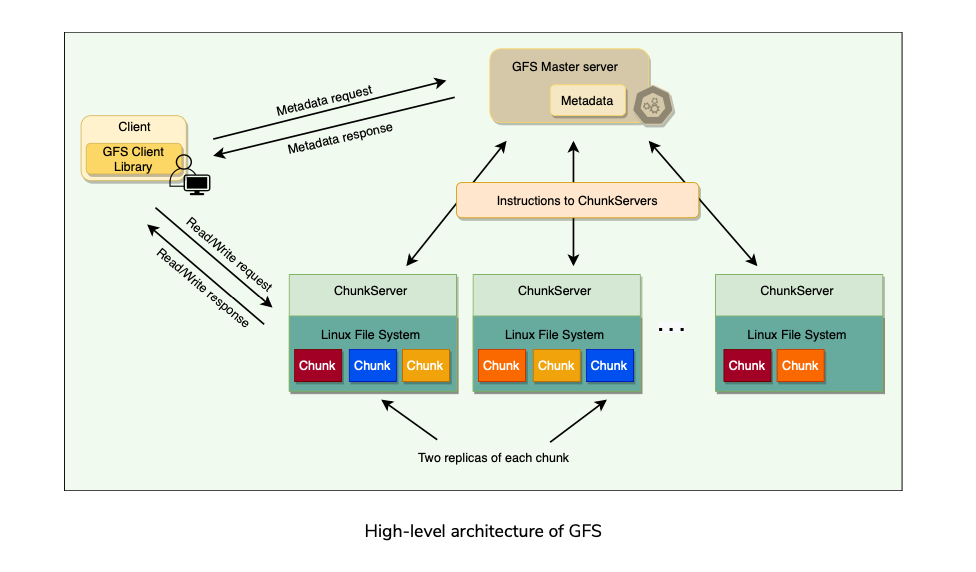
- GFS files are broken down into fixed-size blocks called chunks.
- SSTables are divided into fixed-size blocks and these blocks are stored on the chunk servers. Each Chunk is replicated across multiple chunk servers for reliability.
- Clients interact with master for metadata, and chunk servers directly for SSTable data files.
Chubby
Chubby Recap:
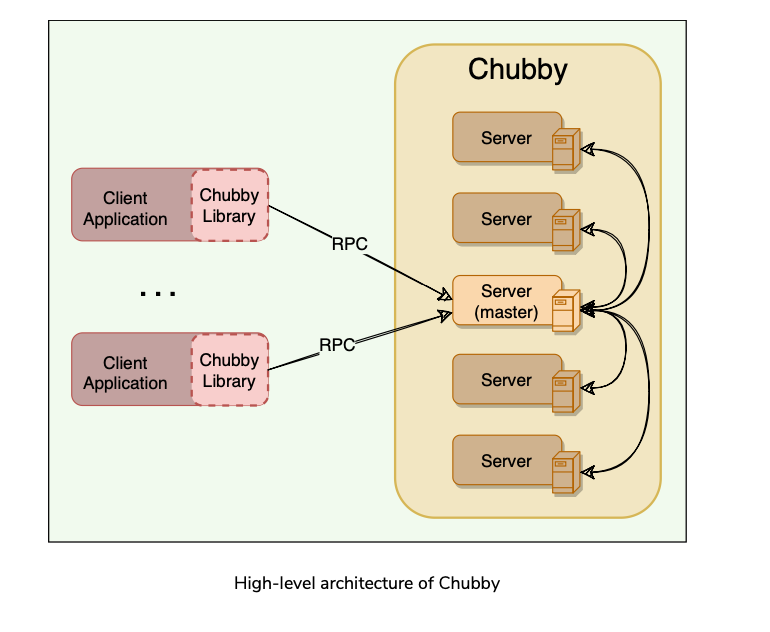
Chubby is a highly available and persistent distributed locking service.
Chubby usually runs with five active replicas, one of which is elected as the master to serve requests. To remain alive, a majority of Chubby replicas must be running.
BigTable depends on Chubby so much that if Chubby is unavailable for an extended period of time, BigTable will also become unavailable.
Chubby uses the Paxos algorithm to keep its replicas consistent in the face of failure.
Chubby provides a namespace consisting of files and directories. Each file or directory can be used as a lock. Read and write access to a Chubby file is atomic. In BigTable, Chubby is used to:
Allows a multi-thousand node Bigtable cluster to stay coordinated.
Ensure there is only one active master. The master maintains a session lease with Chubby and periodically renews it to retain the status of the master.
Store the bootstrap location of BigTable data.
Discover new Tablet servers as well as the failure of existing ones.
Store BigTable schema information (the column family information for each table)
Store Access Control Lists (ACLs).
BigTable Components
A BigTable cluster consists of three major components:
- A library component that is linked into every client.
- One master server.
- Many Tablet servers.
BigTable Master Server
There is only one master server in a BigTable cluster, and it is responsible for:
- Assigning Tablets to Tablet servers and ensuring effective load balancing.
- Monitoring the status of Tablet servers and managing the joining or failure of Tablet Servers.
- Garbage collection of the underlying files stored in GFS
- Handling metadata operations such as table and column family creations.
- Bigtable master is not involved in the core task of mapping tablets onto the underlying files in GFS (Tablet servers handle this).
- This means that Bigtable clients do not have to communicate with the master at all.(What?)
- This design decision significantly reduces the load on the master and the possibility of the master becoming a bottleneck.
Tablet Server
- Each Tablet server is assigned ownership of a number of Tablets (typically 10-1000 Tablets per server) by the master server.
- Each Tablet server serves read and write requests of the data of the Tablets it is assigned.
- The client communicates directly with the Tablet servers for reads/writes.
- Tablet servers can be added or removed dynamically from a cluster to accommodate changes in the workloads.
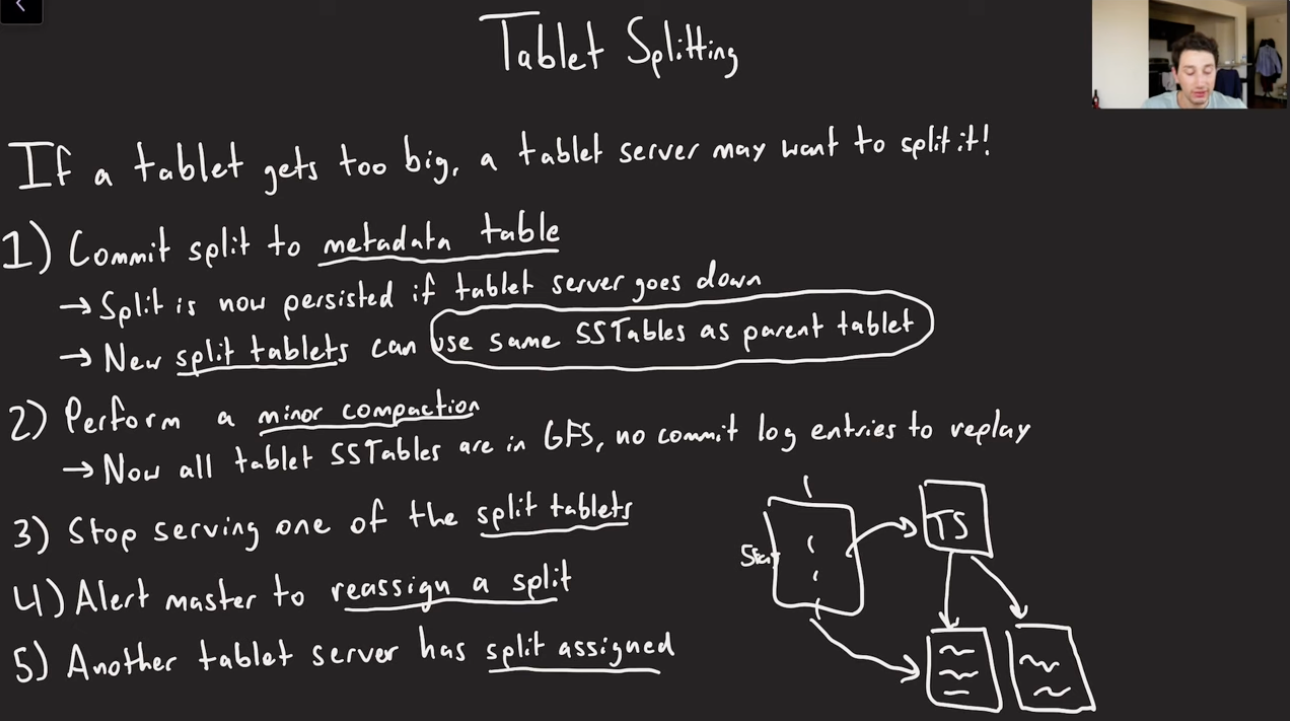
- Tablet creation, deletion, or merging is initiated by the master server, while Tablet partition or splitting(too Large) is handled by Tablet servers who notify the master.
Working with Tablets
Agenda
- Locating Tablets
- Assigning Tablets
- Monitoring Tablet Servers
- Load-balancing Tablet servers
Locating Tablets
Since Tablets move around from server to server (due to load balancing, Tablet server failures, etc.), given a row, how do we find the correct Tablet server?
To answer this, we need to find the Tablet whose row range covers the target row.
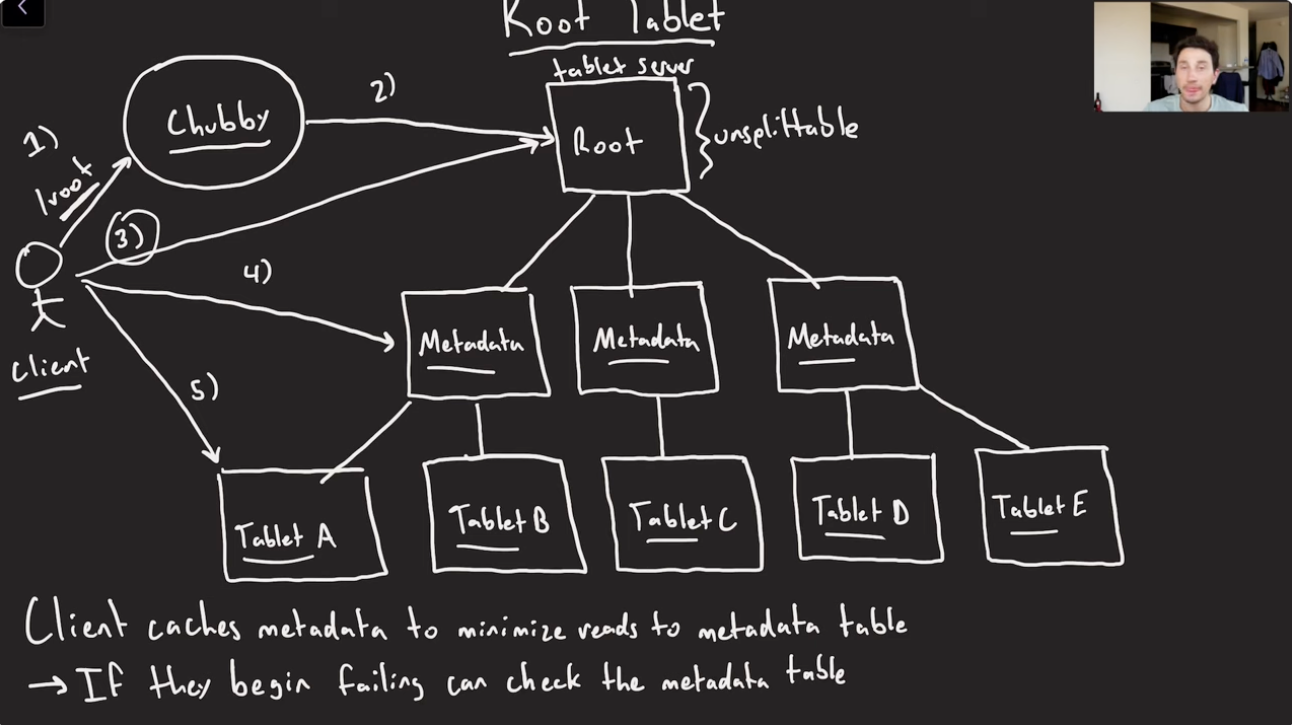
BigTable maintains a 3-level hierarchy, analogous to that of a B+ tree, to store Tablet location information.
BigTable creates a special table, called Metadata table, to store Tablet locations.
This Metadata table contains one row per Tablet that tells us which Tablet server is serving this Tablet.
Each row in the METADATA table stores a Tablet’s location under a row key that is an encoding of the Tablet’s table identifier and its end row.

BigTable stores the information about the Metadata table in two parts:
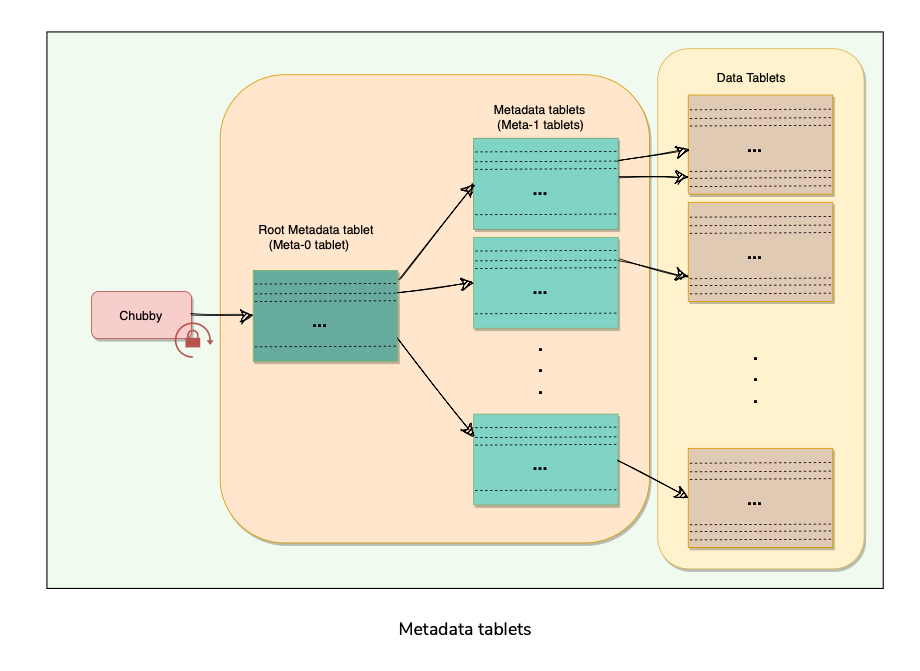
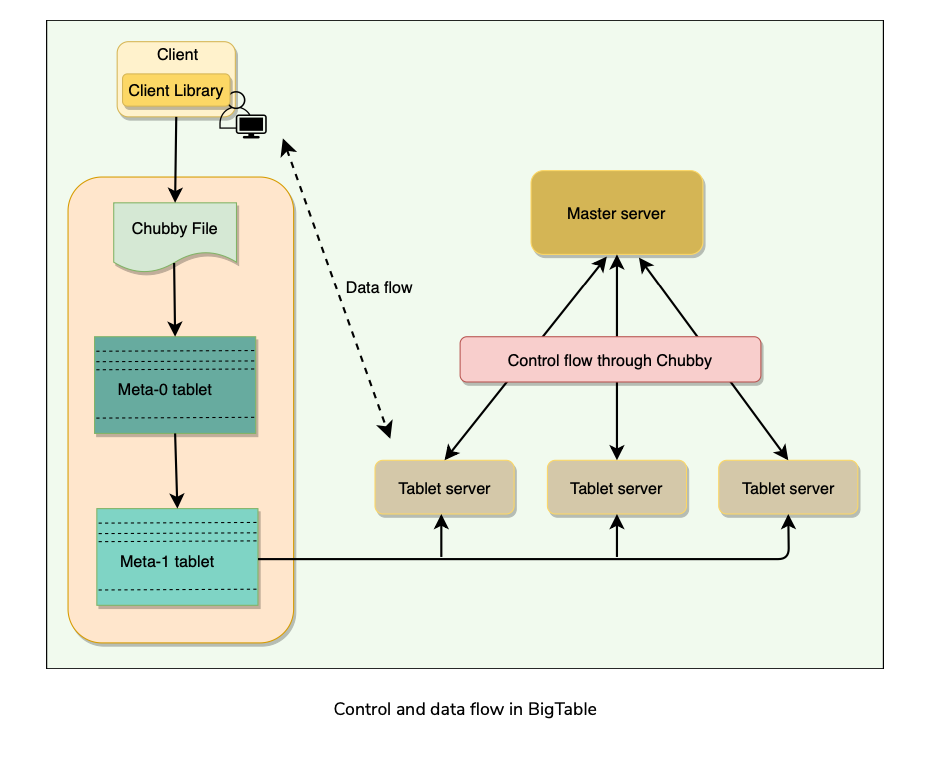
A BigTable client seeking the location of a Tablet starts the search by looking up a particular file in Chubby that is known to hold the location of the Meta- 0 Tablet.
This Meta-0 Tablet contains information about other metadata Tablets, which in turn contain the location of the actual data Tablets.
With this scheme, the depth of the tree is limited to three. For efficiency, the client library caches Tablet locations and also prefetch metadata associated with other Tablets whenever it reads the METADATA table
Assigning Tablets
- A Tablet is assigned to only one Tablet server at any time.
- The master keeps track of the set of live Tablet servers and the mapping of Tablets to Tablet servers.
- The master also keeps track of any unassigned Tablets and assigns them to Tablet servers with sufficient room.
- When a Tablet server starts, it creates and acquires an exclusive lock on a uniquely named file in Chubby’s “servers” directory. This mechanism is used to tell the master that the Tablet server is alive.
- During Master restarts(or startup), following things happens:
Monitoring Tablet servers(Tablet Failures or Network Partitions)
- BigTable maintains a ‘Servers’ directory in Chubby, which contains one file for each live Tablet server.
- Whenever a new Tablet server comes online, it creates a new file in this directory to signal its availability and obtains an exclusive lock on this file. As long as a Tablet server retains the lock on its Chubby file, it is considered alive.
- BigTable’s master keeps monitoring the ‘Servers’ directory, and whenever it sees a new file in this directory, it knows that a new Tablet server has become available and is ready to be assigned Tablets.
- Master regularly checks the status of the lock. If the lock is lost, the master assumes that there is a problem either with the Tablet server or the Chubby.
- In such a case, the master tries to acquire the lock, and if it succeeds, it concludes that Chubby is working fine, and the Tablet server is having problems.
- The master, in this case, deletes the Tablet server’s Chubby lock file and reassigns the tablets of the failing Tablet server
- The deletion of the file works as a signal for the failing Tablet server to terminate itself and stop serving the Tablets.
- It tries to acquire the lock again, and if it succeeds, it considers it a temporary network problem and starts serving the Tablets again.
- If the file gets deleted, then the Tablet server terminates itself to start afresh.
Load-balancing Tablet servers
- Master periodically asks Tablet servers about their current load. All this information gives the master a global view of the cluster and helps assign and load-balance Tablets.
Life of BigTables Read and Write Operations
Write Request
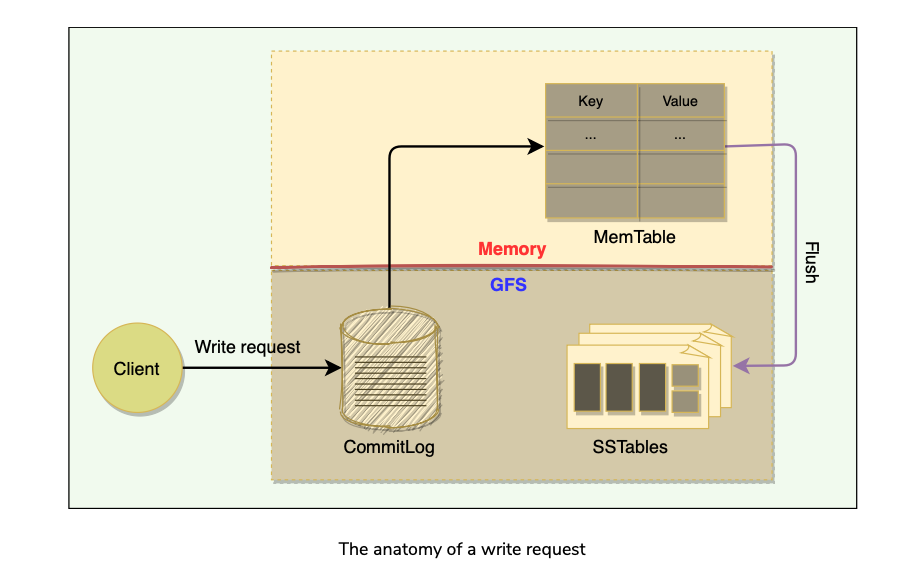
Upon receiving a write request, Tablet server performs the following steps
- Validate request to be well formed
- Does sender Authorization to perform mutation using ACLs in Chubby.
- If authorized, mutation is written to commit-log in GFS that stores redo records.
- Once committed to commit-log, request contents are stored in memory in a sorted buffer called MemTable.
- After inserting data into MemTable, success acknowledgement is sent to the client.
- Periodically, MemTables are flushed to SSTables, and SSTables in the background are merged using Compaction.
Read Request
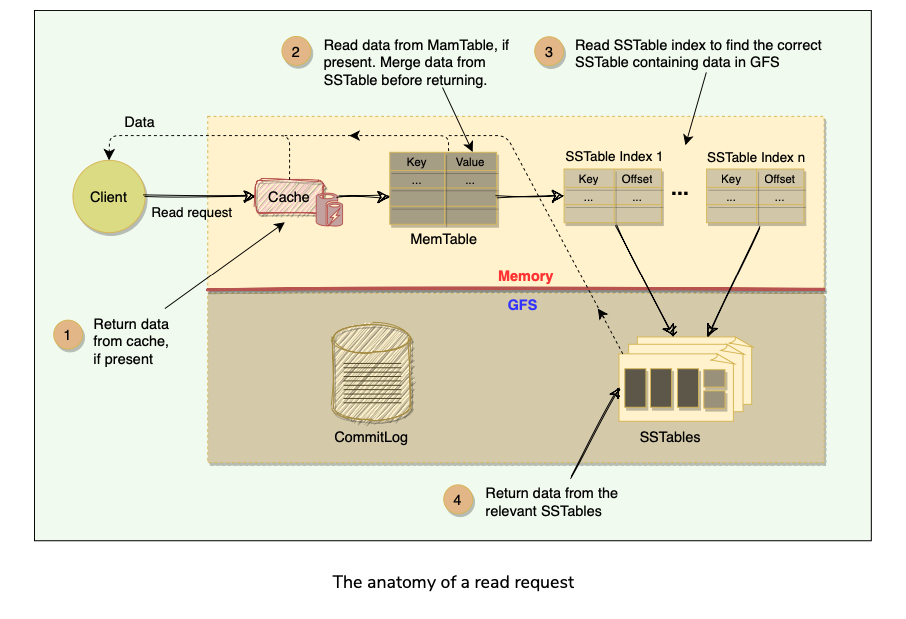
Upon receiving a read request, Tablet server performs following steps:
- Validate request is well formed and sender is authorized.
- Return rows if they are available in cache.
- Read MemTable to find the required rows.
- Read SSTable Indexes that are loaded in memory to find SSTables that will have the required data, then read those rows from SSTables.
- Merge rows read from MemTable and SSTable to find the required version of data.
- Since MemTable and SSTables are sorted, merged view can be formed efficiently.
Fault Tolerance and Compaction
Agenda
- Fault tolerance and replication
- Compaction
Fault tolerance and replication
Fault tolerance in Chubby and GFS
- Both the systems employ a replication strategy for fault tolerance and high availability, that minimizes downtime for Chubby. Similarly, GFS replication creates multiple copies of the data to avoid data loss.
Fault tolerance for Tablet server
- BigTable’s master is responsible for monitoring the Tablet servers.
- The master does this by periodically checking the status of the Chubby lock against each Tablet server.
- When the master finds out that a Tablet server has gone dead, it reassigns the tablets of the failing Tablet server.
Fault tolerance for the Master
- The master acquires a lock in a Chubby file and maintains a lease.
- If, at any time, the master’s lease expires, it kills itself.
- When Google’s Cluster Management System finds out that there is no active master, it starts one up.
- The new master has to acquire the lock on the Chubby file before acting as the master.
Compaction
Mutations in BigTable take up extra space till compaction happens. BigTable manages compaction behind the scenes. List of compactions:
- Minor Compaction(MemTable Written to SSTables)
- Merging Compaction(SSTables + MemTable compacted to Larger SSTable)
- Major Compaction(All SSTables - >Single SS Table)
BigTable refinements
BigTable implemented certain refinements to achieve high performance, availability, and reliability.
Agenda
- Locality groups
- Compression
- Caching
- Bloom Filters
- Unified commit Log
- Speeding up Tablet recovery
Locality groups
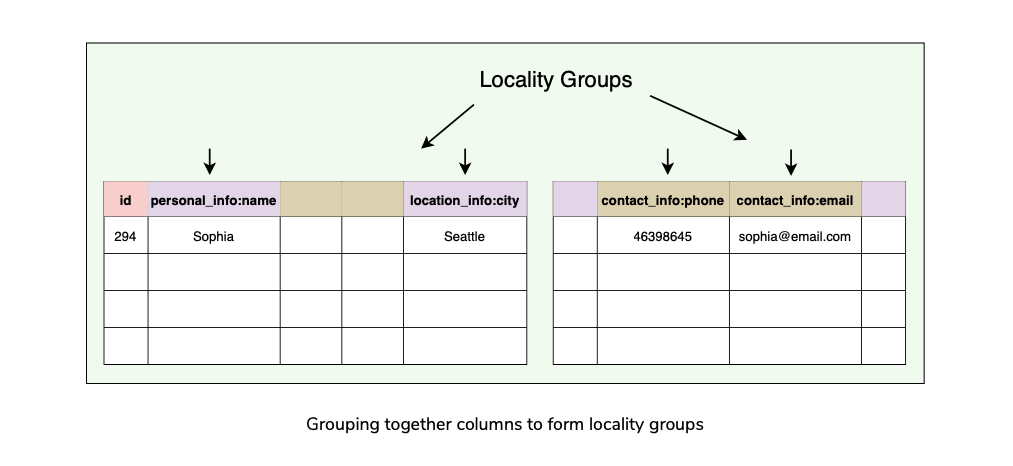
- BigTable uses column-oriented storage.
- Clients can club together multiple column families into a locality group.
- BigTable generates separate SSTables for each locality group.
- This has few benefits:
Compression
- Clients can choose to compress the SSTable for a locality group to save space.
- BigTable allows its clients to choose compression techniques based on their application requirements.
- The compression ratio gets even better when multiple versions of the same data are stored.
- Compression is applied to each SSTable block separately.
Caching
- To improve read performance, Tablet servers employ two levels of caching:
Bloom Filters
- Any read operation has to read from all SSTables that make up a Tablet.
- These SSTables are not in memory, thus the read operation needs to do many disk accesses. To reduce the number of disk accesses BigTable uses Bloom Filters.
- Bloom Filters are created for SSTables (particularly for the locality groups).
- They help to reduce the number of disk accesses by predicting if an SSTable does “not” contain data corresponding to a particular (row, column) pair.
- Bloom filters take a small amount of memory but can improve the read performance drastically.
Unified commit Log
- Instead of maintaining separate commit log files for each Tablet, BigTable maintains one log file for a Tablet server. This gives better write performance.
- Since each write has to go to the commit log, writing to a large number of log files would be slow as it could cause a large number of disk seeks.
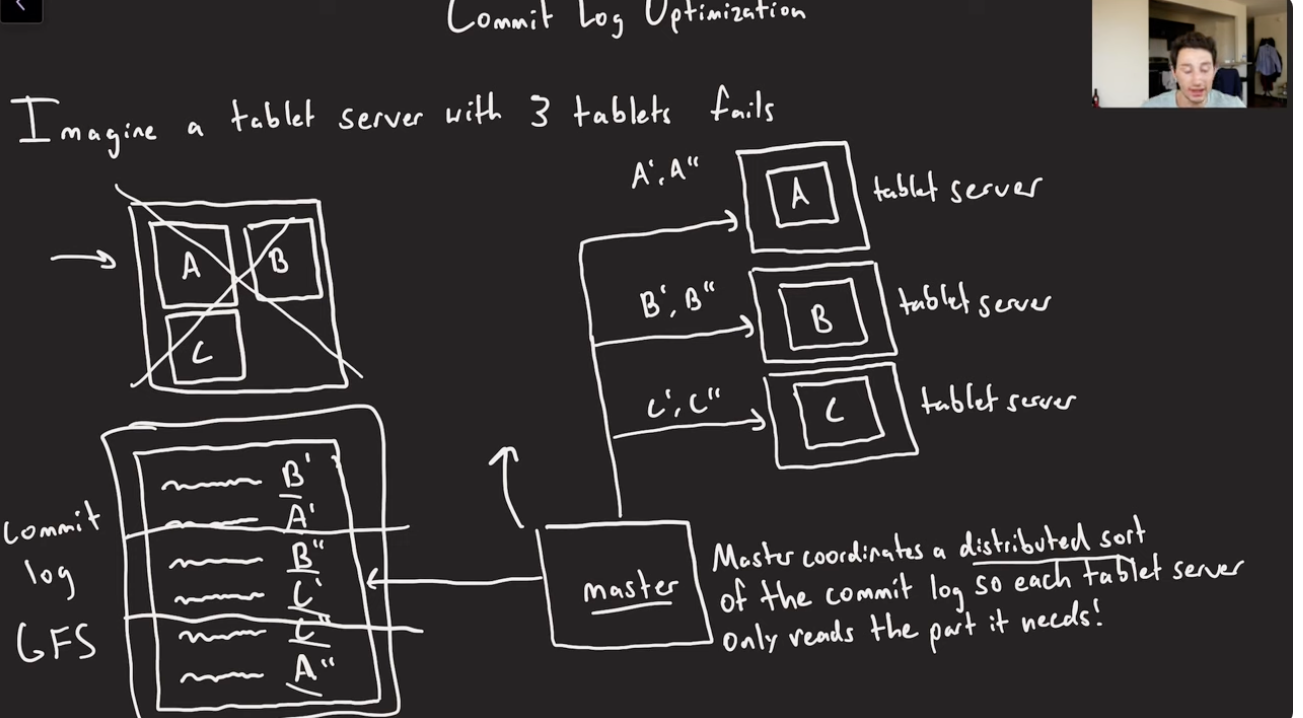
- One disadvantage of having a single log file is that it complicates the Tablet recovery process.
- When a Tablet server dies, the Tablets that it served will be moved to other Tablet servers.
- To recover the state for a Tablet, the new Tablet server needs to reapply the mutations for that Tablet from the commit log written by the original Tablet server.
- However, the mutations for these Tablets were co-mingled in the same physical log file. One approach would be for each new Tablet server to read this full commit log file and apply just the entries needed for the Tablets it needs to recover.
- However, under such a scheme, if 100 machines were each assigned a single Tablet from a failed Tablet server, then the log file would be read 100 times.
- BigTable avoids duplicating log reads by first sorting the commit log entries in order of the keys <table, row name, log sequence number>.
- In the sorted output, all mutations for a particular Tablet are contiguous and can therefore be read efficiently.
- To further improve the performance, each Tablet server maintains two log writing threads — each writing to its own and separate log file.
- Only one of the threads is active at a time. If one of the threads is performing poorly (say, due to network congestion), the writing switches to the other thread. Log entries have sequence numbers to allow the recovery process
Speeding up Tablet recovery
- One of the complicated and time-consuming tasks while loading Tablets is to ensure that the Tablet server loads all entries from the commit log.
- When the master moves a Tablet from one Tablet server to another, the source Tablet server performs compactions to ensure that the destination Tablet server does not have to read the commit log. This is done in 3 steps:
Tablet Splitting
Concurrency on MemTable
- Want to avoid read-contention when writes are also happening on the same rows.
- Use Copy-on-write semantics on a per-row basis.
Performance Observations
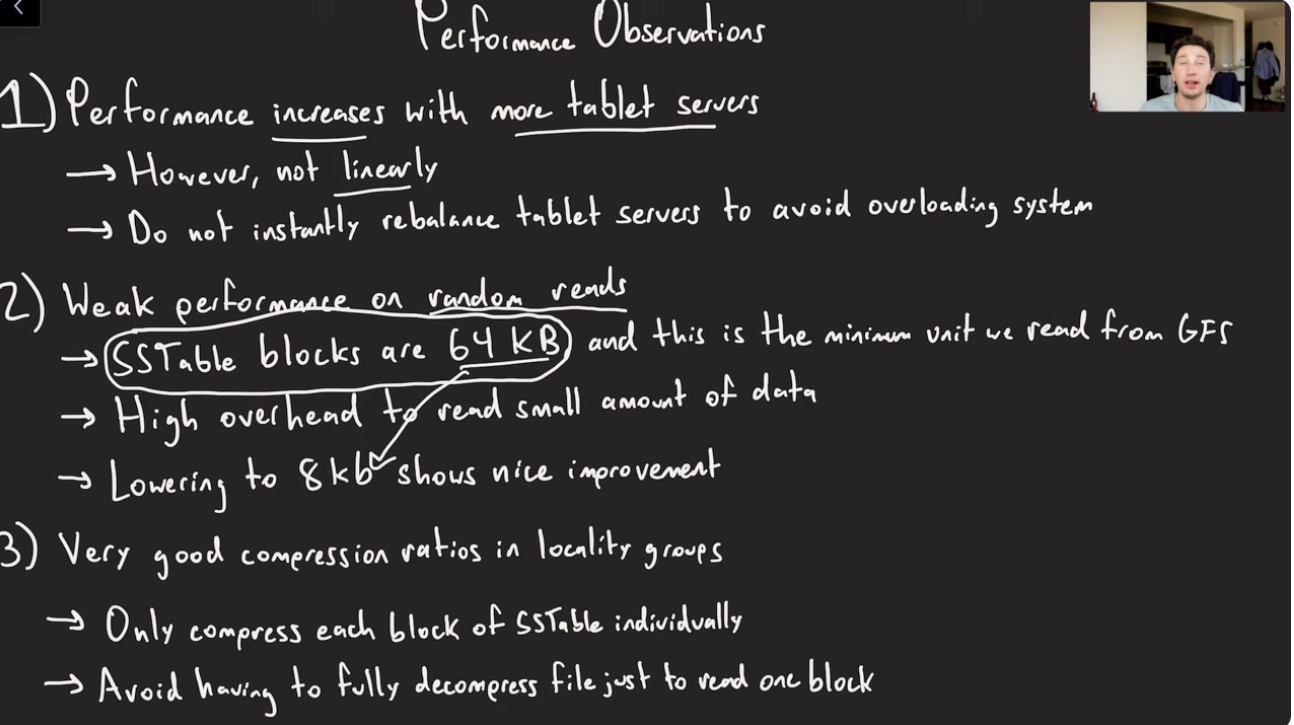
BigTable Characteristics
BigTable performance(and Popularity)
- Distributed multi-level map: BigTable can run on a large number of machines.
- Scalable means that BigTable can be easily scaled horizontally by adding more nodes to the cluster without any performance impact. No manual intervention or rebalancing is required. BigTable achieves linear scalability and proven fault tolerance on commodity hardware
- Fault-tolerant and reliable: Since data is replicated to multiple nodes, fault tolerance is pretty high.
- Durable: BigTable stores data permanently.
- Centralized: BigTable adopts a single-master approach to maintain data consistency and a centralized view of the state of the system.
- Separation between control and data: BigTable maintains a strict separation between control and data flow. Clients talk to the Master for all metadata operations, whereas all data access happens directly between the Clients and the Tablet servers.
Dynamo vs. BigTable
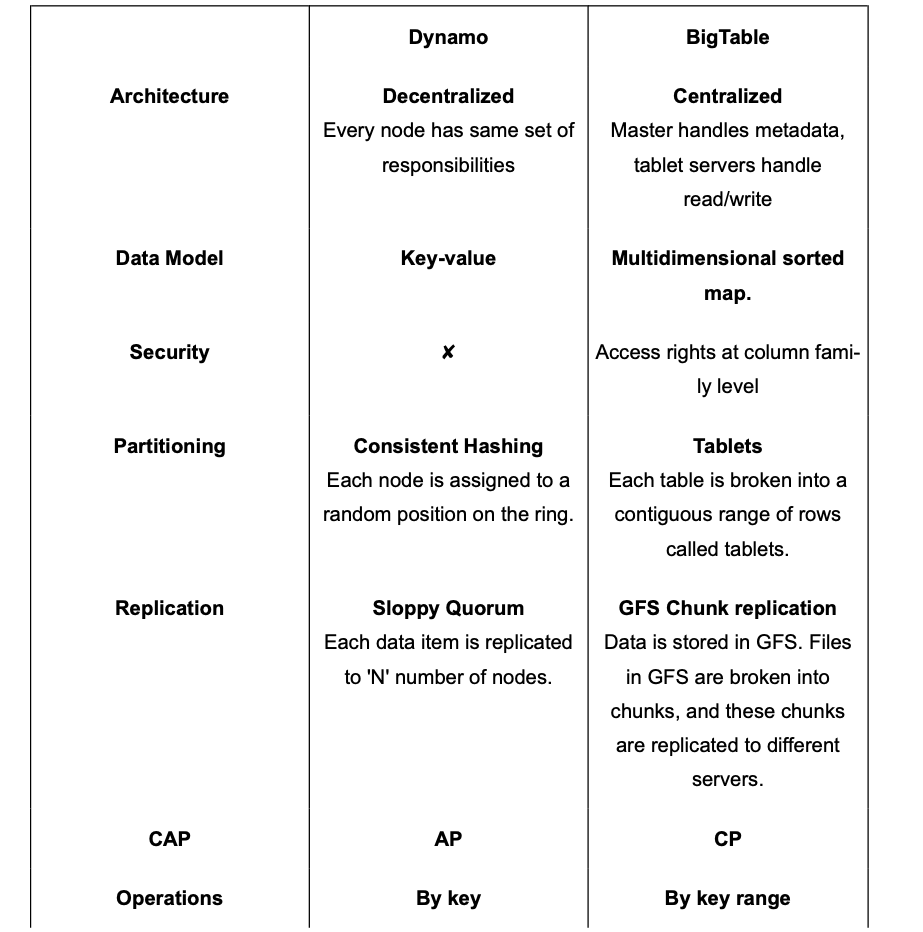
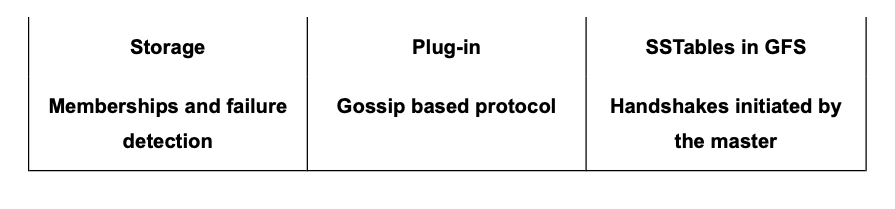
Datastores developed on the principles of BigTable
Google’s BigTable has inspired many NoSQL systems. Here is a list of a few famous ones:
- HBase: HBase is an open-source, distributed non-relational database modeled after BigTable. It is built on top of the Hadoop Distributed File System (HDFS).
- Hypertable: Similar to HBase, Hypertable is an open-source implementation of BigTable and is written in C++. Unlike BigTable, which uses only one storage layer (i.e., GFS), Hypertable is capable of running on top of any file system (e.g., HDFS, GlusterFS, or the CloudStore ). To achieve this, the system has abstracted the interface to the file system by sending all data requests through a Distributed File System broker process.
- Cassandra: Cassandra is a distributed, decentralized, and highly available NoSQL database. Its architecture is based on Dynamo and BigTable. Cassandra can be described as a BigTable-like datastore running on a Dynamo-like infrastructure. Cassandra is also a wide-column store and utilizes the storage model of BigTable, i.e., SSTables and MemTables.
Summary
- BigTable is a Distributed wide column storage system designed to manage large amounts of semi-structured data with High Availability, Low Latency, Scalability, and Fault tolerance.
- It is a sparse, distributed, persistent, Multi Dimensional sorted map.
- Map is indexed by a unique key made up of Row Key(up to 64 KB), Column key, and a timestamp(64-bit integer).
- Columns are grouped into Column families. RowKey and Column key uniquely identifies a Column data cell. Within each cell, data is further indexed by timestamps to store multiple versions of the data.
- Each read/write to a row is atomic. Atomicity across rows is not guaranteed.
- A BigTable’s Table could be a multi-TB table. A Table is broken into a smaller range of rows called Tablets.
- One Master server and multiple Tablet Servers.
- Master does metadata management, Assigns Tablets to Tablet servers, does Tablet rebalancing etc.
- Read/Write of data goes directly to the tablet servers.
- Tablet servers store each tablet as a set of Immutable SSTable files, each of which is further divided into 64KB Data Blocks. SStables are stored as Chunks in GFS and replicated to different chunk servers.
- To enhance read performance, especially reducing disk seeks while trying to check for existence of a Key from each of SSTable, Bloom filters are used to check for existence.
- BigTable relies on Chubby for master server selection(and Failover), using Locks, and also master check if the Tablet servers are alive, since they take a lock on the Chubby’s server directory.
- Writes first go to a Commit Log(WAL) for failure recovery, then to In-Memory MemTable(where it’s kept as a Sorted Map), and when it breaches threshold, its written to SSTable.
- MemTables, SSTables merged and SSTables are compacted to bigger SSTable in background using compactions.
- All the read operations are served from a Merged view of MemTable and All SSTables.
Reference
- BigTable
- SSTable(LSM Trees)
- Amazon Dynamo
- Cassandra
- HBase
- Jordan BigTable
Paper Link: https://static.googleusercontent.com/media/research.google.com/en//archive/bigtable-osdi06.pdf
Last updated: March 15, 2026
Questions or discussion? Email me